

Find the right help from what you saw
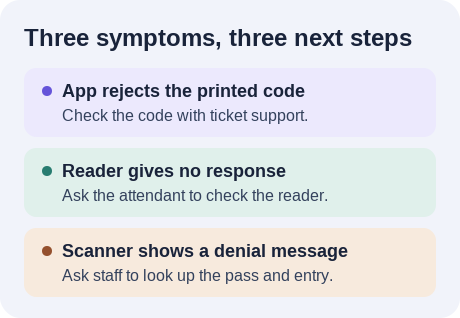
| What you saw | First thing to check | Who can help |
|---|---|---|
| The registration app rejects the printed code | Check that you're in the event's official app or registration page and that the code matches the band you're wearing | Ticket support or the event box office |
| The reader gives no response | Present the band once more as staff direct, at the marked read point | The lane attendant or reader support team |
| The scanner reports “unknown,” “already scanned,” or access denied | Ask staff to check the exact message, entrance and event day | Ticket support or the supervisor handling access at that entrance |
| Entry worked, but payment failed later | Ask the cashless desk to check the payment or account status before trying again | Event cashless support |
If the wristband won’t register
Start with this edition’s registration instructions. For example, Coachella’s 2027 FAQ says registration is mandatory and takes place in its app. The 2026 High Water activation guide says wristband activation was optional for admission. An app error may need to be resolved before arrival, depending on which rule your event uses.
If you see “item not found,” check each character against the code printed on the band. Front Gate Tickets’ registration help points out that letters and digits can look alike. If the correct code is still rejected, use the event’s official support channel. Have the band and order confirmation ready, plus ID if the event asks for it. Share a photo of the code only through an official support channel that requests it.
If the gate reader gives no response
Bring the band to the marked spot on the reader as the attendant shows you. If the band’s tag is a separate tab or disc, present that part. Keep other passes out of the way and give the reader a moment. If there is still no result, ask the attendant to direct you to a staffed checkpoint. Keep the band intact so staff can inspect it.
No response at one lane gives staff a clue about where to look. If several bands fail at the same lane, the supervisor can check that reader and its connection using the event’s approved procedure. If only your band fails and staff can reproduce the issue at an approved checkpoint, they can inspect the band and check the order before deciding whether it needs replacement.
If the scanner shows a message but won’t let you in
Tell the attendant the exact message. “Unknown pass” may require a check of the order or the list used at that entrance. “Already scanned” means staff need to review the previous check-in and the event’s re-entry rules. A zone or time restriction calls for checking which entrance and date the pass covers. Weezevent’s check-in guidance, for example, shows how software can assign access by location or time. Its scan error guide distinguishes several different reasons for a rejected scan.
If you are returning after leaving, mention when and where you exited. Coachella’s 2027 pass rules require scanning out to scan back in. Your festival may use a different process. If the same band worked earlier, that detail helps staff trace the check-in record and decide what to do next.
What staff can check before replacing a band
When a guest is waiting, start with one question that will change the next step. Can the approved reader detect an authorized test credential? If it can, see whether the guest’s band produces a message on the same setup. If the test credential also gives no response, the lane needs attention. Use your platform’s test mode or the event’s designated test credential so the check doesn’t accidentally consume a real admission.
| Pattern seen at the gate | First check for the supervisor | What the result helps you decide |
|---|---|---|
| One band gets no response at two approved checkpoints | Check the credential assignment and inspect the physical tag under the event's procedure | Whether the box office needs to assess that particular band |
| Several bands give no response on one lane | Compare that reader with a working lane using the same authorized test setup | Whether to divert people while reader support checks the station |
| Bands are detected, but only one pass type is rejected | Check the event date, pass type and list assigned to the device | Whether the rule is expected or the lane has the wrong access list |
| New purchases or replacements fail while previously issued bands work | Ask whether the device has received the latest assignments or updates | Whether ticket support needs to confirm the new record and reader support needs to check synchronization |
| A band worked earlier and now says “already scanned” | Look up the previous access event and ask whether the guest left through a designated exit | Whether the event's re-entry procedure applies |
These patterns guide the investigation. For example, a batch of recently issued bands might fail because the device is out of date, because assignments were incomplete, or because the passes don’t cover that entrance. The exact error and the official record help distinguish those cases. If several bands fail together, let a supervisor own the lane check while ticket support deals with individual orders. That saves attendees from being sent between desks without a clear next action.
If the device lost its connection
A reader can detect a credential while the software using that read has an out-of-date entry list. Some platforms support checking against data already on a device and uploading scans once a connection returns. For example, WeezAccess documents offline behavior for its Android ticket-scanning app. That example is about its own ticket app. Ask your platform what the RFID configuration at your event supports.
Before relying on a device that’s been offline, confirm when it last updated, what records it has available, and who should review conflicts when it reconnects. A replacement issued at the box office after the last update may need an official check before the lane can recognize it. The entry supervisor can route the guest to the designated staffed point while support confirms the replacement record. Keep the exact time, lane, and result for the handoff. Avoid trying to infer pass validity from the reader’s connection indicator alone.
An organizer can rehearse this with two approved devices before opening. Update a test pass through the normal ticket support workflow, then check how the two devices display it before and after synchronization. Check the instructions staff should give while the result is unresolved, and which team is responsible for closing the incident.
A short handoff for gate staff
Give the receiving desk six pieces of information when available.
- The lane or reader and approximate time.
- The exact scanner message, or that it gave no response.
- The event day, entrance and pass type the guest is trying to use.
- Whether this is a first entry or a return.
- Whether another guest has reported the same symptom at that lane.
- Any check already performed and which desk is taking over.
For example, “North gate, around 6:10, already scanned, Saturday general admission, guest returning from outside” gives the ticket desk a prior entry to look up. “North gate, no response on several bands” gives reader support a lane to check. These are example handoffs. Use your event’s system for recording credentials or attendee information, and leave access changes or replacements to authorized staff. For planning the underlying entry setup, see RFID wristbands vs. QR codes for event entry.
If the box office decides to issue a replacement
Have the band and order confirmation ready, along with any identification the event asks for. Explain whether the band ever worked, whether it was registered, and what staff saw at the gate. If you already visited another desk, say which one and what it checked. This helps the next staff member continue the same case.
For staff, use the event’s authorized replacement process and verify what happened to the old credential and what access was assigned to the new one. If the event has separate services for camping or cashless payments, check which records those teams maintain and who should handle them. Admission and payment status may be managed separately. Keep any credential details in the event’s own support system.
Here’s a fictional example. A guest with a Saturday pass shows an intact band at the correct gate. The reader reports that it doesn’t know the credential. At the box office, staff confirm the order and discover a replacement was just issued. The supervisor checks whether the gate received the new assignment, then confirms the replacement through the event’s official process. The useful detail is that staff saw a specific message. They had a reason to look up the assignment before assuming the physical tag was damaged.
A gate rehearsal before doors open
Ask entry staff, ticket support and reader support to run a short rehearsal together. Give each team the same sample messages and have them hand off a case in real time. For each scenario, note who takes over and what the guest is told to do.
- Present a valid test pass at the intended entrance and check that the device shows the expected result.
- Try an authorized test pass for a different day or entrance and check that staff can explain the outcome.
- Run your documented exit and re-entry procedure. Have the supervisor demonstrate where to review the prior entry.
- Simulate an unresponsive lane through the approved test process and check that the team can direct people to a working, staffed checkpoint.
- Run a test replacement through ticket support. Confirm how it reaches the gate and who checks linked services if the event uses them.
Put the event’s exact messages, approved support destinations and escalation contacts on a one-page staff sheet. “Send them to the box office” helps only if staff know which box office can handle wristbands and where it is. A guest should leave the lane knowing who can help and what to bring.
Frequently asked questions
Can I check my festival wristband with my phone?
A phone test can’t tell you whether your pass will be accepted at the gate. A compatible phone may read some NFC tags, but the venue uses its own readers, software and entry rules. If you’re curious about phone behavior, see which wristbands a phone can read.
Should I remove a damaged wristband before going to the box office?
Keep the wristband and ask the event box office how it wants you to handle it. Front Gate Tickets directs attendees to the festival box office for replacement inquiries. The event sets the rules on proof of purchase, eligibility and fees.
What if I can enter but can’t pay with the wristband?
Ask the cashless support desk to check the account or transaction. Tell them whether the terminal reported a decline or the purchase status is unclear. If you’re unsure whether a charge went through, ask staff to check before tapping again. See how cashless festival wristbands work for more on balances, top-ups and refunds.
What is the difference between no read and access denied?
No read means the reader did not obtain the expected response. A denial can follow a successful read when the credential lacks permission.
Why might a wristband work at one gate but not another?
The gates may have different readers, configurations or zone permissions. Tell support which gate worked and the exact message at the other.
Can a wristband be readable but not registered to my ticket?
Yes. The platform still needs the correct ticket-to-credential association. Ask authorized staff to check the issue record.
Should I keep tapping after an unclear cashless transaction?
Ask staff to check the transaction status first. Repeated taps do not establish whether the original charge was accepted.
Can a gate connection problem look like a wristband fault?
Yes. Reader or platform connectivity can interrupt a lookup. Staff should compare other passes and follow the event’s approved offline procedure.
What information helps the support desk diagnose a failure?
Give the location, time, displayed message and whether other gates worked. Keep the wristband and ticket evidence available for authorized staff.
Can buying another NFC tag fix a festival pass?
No. A replacement must be issued through the organizer’s ticketing process. A readable blank tag does not inherit admission or account rights.