
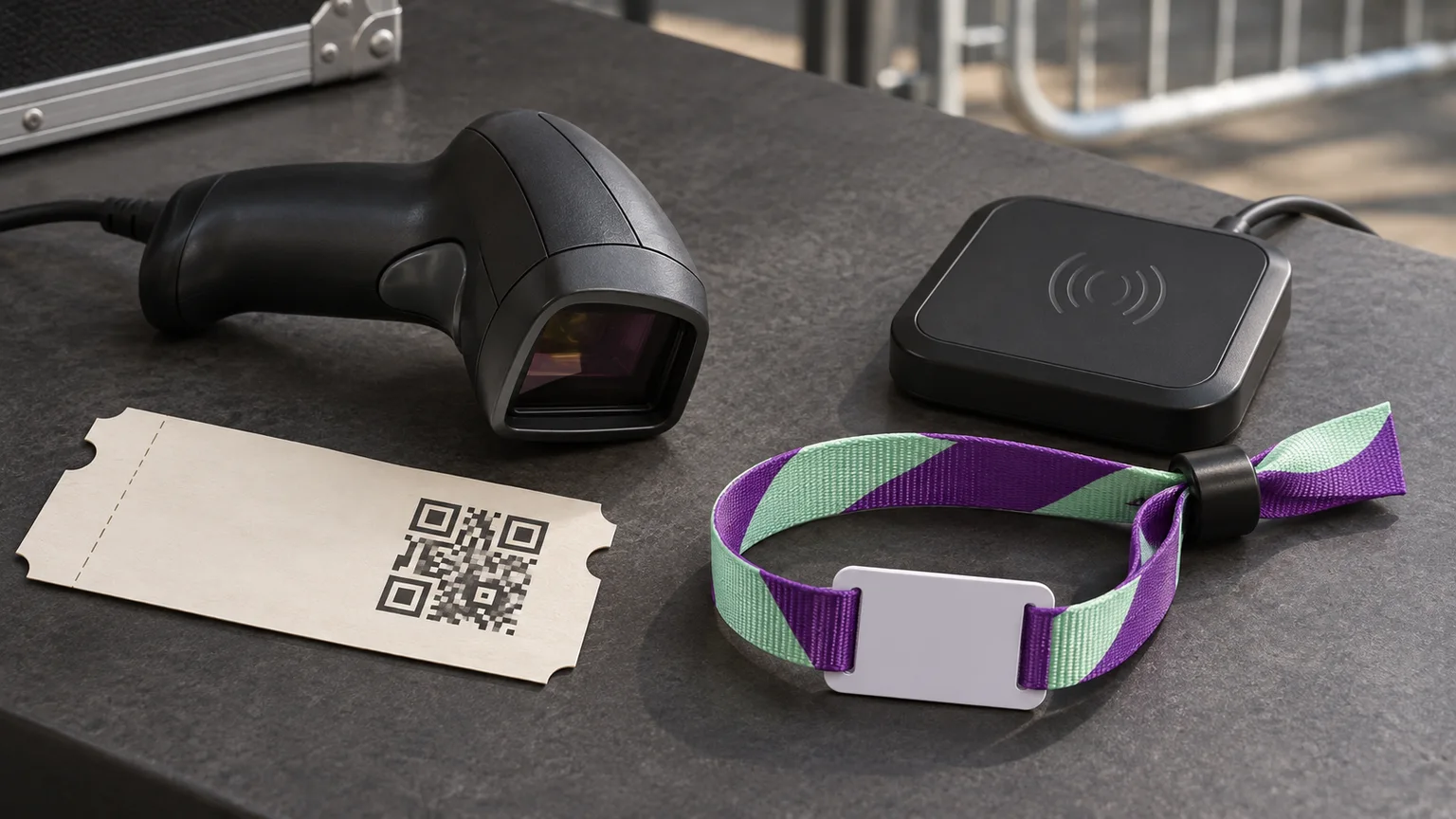
What the scanner sees and what the system decides
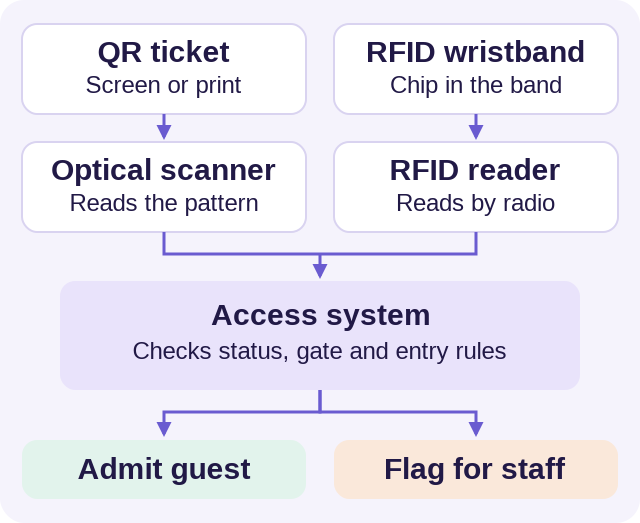
A QR code is an optical pattern. A camera or scanner must see it clearly enough to decode it. An RFID reader uses radio to communicate with a compatible chip inside a wristband. In either case, the reader obtains credential data and the access system uses it to decide whether to admit the guest.
That decision can depend on the ticket status, the gate, the time of day or whether the guest already checked in. A reader can successfully scan a credential that the system then declines. Staff need to recognize the difference between an unreadable ticket and a valid read with a denied result. One calls for another attempt or a lookup. The other calls for checking the admission rule or sending the guest to support.
A QR code can be printed on a wristband as well as on a ticket. What matters is the data it carries and how the system uses it. A shared code for the event map can send everyone to the same page. An admission code has to identify a credential the check-in system can validate. Similarly, an RFID wristband needs a compatible reader and an active assignment before it can be used for electronic admission. See how RFID wristbands work for the reader-to-software sequence.
QR and RFID under the same entry rules
| Operational decision | QR ticket or printed QR band | RFID wristband |
|---|---|---|
| What guests present | An approved screen or printed code. Check whether the ticket platform supports both. | A band with the credential your reader expects. Mark or demonstrate where to present it. |
| Where the credential is issued | Often sent with registration. It can also be printed on site if the event supports that process. | Handed out or shipped. Decide who fits it and when it becomes associated with the correct ticket. |
| What staff need | An optical scanner or supported camera and the correct check-in list. | Compatible readers, the relevant access lists and an issue or assignment process. |
| What can interrupt the read | A damaged print, poor screen visibility or a code format the scanner cannot read. | A damaged band, an unsupported chip or poor positioning at the reader. |
| What controls repeated admission | The access system’s rules and the ticket’s recorded state. | The access system’s rules and the issued credential’s recorded state. |
| How to resolve a missing credential | Look up the ticket, confirm the guest’s eligibility and follow the reissue policy. | Find the original assignment, resolve or revoke it as required and verify the replacement. |
Use the same assumptions for both columns. If the QR trial has one trained operator and the RFID trial has a separate help desk, the results reflect two different staffing plans. Include arrival peaks, the time guests need to find or receive the credential and the handling of rejected scans.
When to use each workflow
One admission check
Start with QR if the ticket platform already issues a readable code and guests mostly need to check in once. For a conference, a phone screen may work for many arrivals, while an approved printed ticket or a staffed lookup helps people who cannot show their phone. Find out which formats your platform accepts before telling guests to print a copy.
A one-time entry rule needs a defined response to a second scan. Test it at two stations, with the actual lists and permissions in place. The operator should know whether a warning means the guest used the ticket earlier, presented the wrong ticket or is at the wrong gate. Give staff a referral path for each outcome. That keeps a ticket dispute from holding up the next group in line.
Re-entry and several access zones
Map where guests will enter, exit and return. If re-entry depends on a recorded exit, decide how to handle an exit that was missed. Then list the spaces that need their own checks, such as a workshop, a backstage corridor or a sponsor lounge. A gate may need to confirm eligibility without consuming the guest’s one-time admission.
A worn RFID credential is worth testing if guests will present it repeatedly and your readers can check it at each location. QR can also support repeated access. The WeezAccess operator guide, for example, documents separate control lists and an optional exit mode. Pick the workflow your staff can operate at each gate and verify the permissions in the platform you plan to use.
Scan a QR ticket on arrival and issue a wristband inside
This setup is useful when ticketing is already in place and guests need something they can wear after the first check. The issue desk validates the ticket, identifies the access group and hands over the right band. A different band color for each access group helps staff recognize it at the next checkpoint.
For an electronic check inside, add an assignment step. Staff must associate the new wristband with the correct admission record or permissions and verify the band at the desk. Decide whether the original ticket can still be used after handoff. For example, a weekend festival may accept the QR ticket only to collect a band, then require the assigned band for re-entry. Use that rule in rehearsal and state it plainly in the instructions sent to guests.
Account for fitting and assignment in your staffing plan. A fast read at the gate does little for the arrival queue if guests are waiting for the correct band at a single issue station. Keep the exceptional cases visible in the plan: tickets bought under another person’s name, bands handed to the wrong guest and replacements that inherit only some permissions.
How duplicate scans, transfer and replacement differ
A copied static QR code can be presented again. A second gate can reject it if the system knows the ticket was already used and the event applies that rule. Dynamic mobile barcodes add a different check. Ticketmaster’s moving barcode guidance describes tickets that refresh on screen and cannot be presented as screenshots. That example applies to those tickets. Printed or downloadable formats depend on the platform.
An RFID wristband adds a physical decision: should a guest be able to remove and put it back on? A one-way closure can make transfer harder, but the electronic system still needs to decide whether the credential is active. A guest who reports a lost band should have a defined place to go, and staff should have a way to establish whether a replacement is allowed. Eventbrite’s RFID wristband guide gives an example of linking bands to individual records and deactivating a lost credential.
For either format, rehearse what happens when staff issue a replacement. The new credential should get only the intended access. Check whether the original stops working at every relevant gate, including a gate that temporarily lost its connection. If the venue cannot confirm a revocation at every station right away, document the manual response and who is authorized to use it.
What happens when a gate loses its connection?
Separate two questions. Can the guest still display the ticket or present the band? Can the station still validate that credential and apply changes made elsewhere? A visible QR code or a readable chip answers only the first question.
A platform may let stations continue using downloaded data and sync later. WeezAccess documents that behavior after its initial data download. Confirm whether your own system can see new sales, recent replacements or scans recorded at a different gate while a station is disconnected. Test recovery with two stations, then verify that their records match what actually happened.
Agree in advance on which decisions staff can make during an outage. If a gate cannot confirm an unusual case, give the operator a support contact and a place for the guest to wait away from the main line. Keep this procedure with the access plan so it can be used when staff do not have time to look up the platform’s documentation.
A rehearsal before doors open
- Use the actual ticket and band formats. Bring the intended readers, printed samples and representative phones. Check that staff can read a worn band comfortably and that an approved printed ticket still scans in the lighting at the gate.
- Walk the route as different guests. Try a first admission, an allowed return and a denied zone. Ask the operator to explain the result without relying on someone who set up the test.
- Repeat the awkward cases. Try a duplicate at a second station, a missed exit and a lost-credential replacement. For a mixed workflow, try using the original QR ticket after issuing a band.
- Rehearse a disconnected station. Record what continues to work, what needs manual escalation and how to reconcile scans when the station reconnects.
- Measure the whole interaction. Include ticket retrieval, wristband fitting where applicable and the time staff need to handle failures. Use that rehearsal to estimate staffing and equipment for your own event.
Record the chosen workflow, reader requirements and replacement procedure with the event specification. The wristband project brief guide shows where to capture those details before ordering.
Sources
- Weezevent: mobile ticket scanning, exit mode and synchronization
- Ticketmaster: moving barcodes on mobile tickets
- Eventbrite: RFID wristband assignment and replacement
References checked November 21, 2026.