

When a buyer already has a ticketing system, I ask the provider which credentials its readers accept before I narrow down the sample. For the sample, I want to know where the guest’s wrist will be. Someone opening a locker can hold a wrist still. A guest walking through a gate may turn sideways with their wrist against a coat. I’d write those two tests differently even if both projects call the product an RFID wristband.
RFID wristband read range by reader type
| Reader and wristband | Distance to plan for | What to test |
|---|---|---|
| Phone and NFC wristband, 13.56 MHz | A close tap | Try the finished wristband on the phone models people are likely to bring. |
| HF door, locker or cashless reader, 13.56 MHz | Close presentation at the reader face | Use a credential the operator has approved. Check that the door opens or the transaction posts. |
| LF proximity reader, often 125 kHz | Close presentation at the installed reader | Start with a working credential for that reader and compare the wristband from the angle a wearer can reach. |
| Fixed UHF or RAIN RFID reader | Meters are possible with an on-body design and a suitable antenna setup | Walk the lane in both directions and count reads from neighboring lanes separately. |
If you still need to identify the equipment, use the LF, HF and UHF frequency guide. Two 13.56 MHz readers can support different credentials. Check the protocol and credential with the operator before using a distance test to compare bands.
How close does an NFC wristband need to be to a phone?
Start at the back of the phone where its NFC antenna sits. Move it slowly over the tag area while the band is on the wrist. Once you have a spot that works, ask someone else to try from the start with the phone in its case. Watch whether they find it on the first attempt. If they hold the phone over the clasp instead of the tag, move the tap mark over the inlay in the artwork proof.
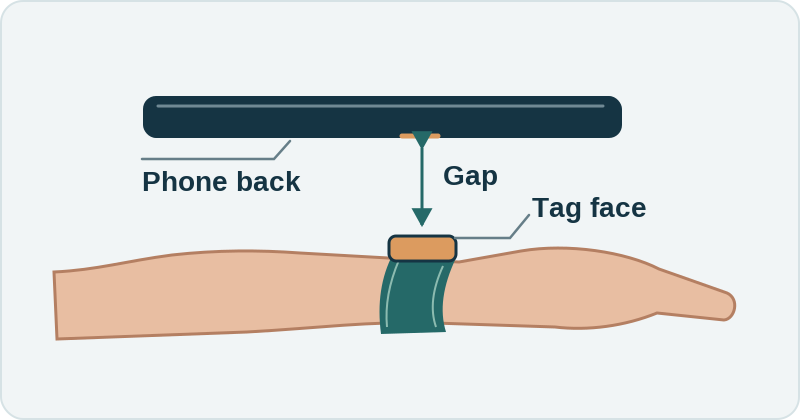
The NFC Forum’s Release 15 specification update extends the operating volume for compliant equipment to 2 cm. Use that number to understand the specification. Measure your sample with the actual phone and case before printing a distance on the band or the instructions.
If the phone offers the link, it has read the tag. Open the link to see if the page loads on the event network. A door test has its own second step. A reader can detect a credential while the lock denies access, so check the account or room assignment before moving the reader or replacing the band. The phone compatibility guide explains which forms of RFID a phone can check.
UHF wristband range on the wrist and in free air
A passive UHF band takes power from the reader and answers by modulating the signal it reflects. The tag antenna has to work close to skin and around the curve of the wrist. The body can absorb some of the signal, and bending the antenna can shift the frequency at which it works best. Researchers saw these differences when they compared flat and curved UHF wristband antennas. Once the wearer moves, the angle to the reader changes too. At a gate, try the band on the wrist nearest the antenna and again on the far wrist with the wearer’s body in between.
SATO quotes roughly 2 m on the wrist and up to 10 m clear of other objects for its Safety Band UHF RFID, item 162014251. The two figures come from the same product sheet and depend on the device, environment and frequency. If a supplier sends a free-air figure, ask for an on-wrist result for that same sample.
A separate tag on a printed fabric wristband sits differently from an inlay enclosed in the strap. On a UHF order, ask the supplier to note which inlay they used and where it sits. Keep those details with the approved sample. If the next sample moves the inlay, repeat the on-wrist test.
How to improve a short or unreliable read
Start with a credential that already works on the reader. If it fails from the usual position too, check the reader and its configuration with the operator. If it works, present the new sample with the tag facing the reader. A sample that reads flat and fails on the wrist gives you a specific comparison to take back to the supplier. Send the fit, tag position and angle used in both tests.
For a phone or locker, work on the point of presentation first. Can the guest find the tag? Can they put it against the usable part of a recessed reader? If a cover or case changes the result, include it in the next trial. Test likely wear conditions as part of the same setup. A resort should try the wristband as a guest would use it after the pool, with the installed equipment suitable for that location.
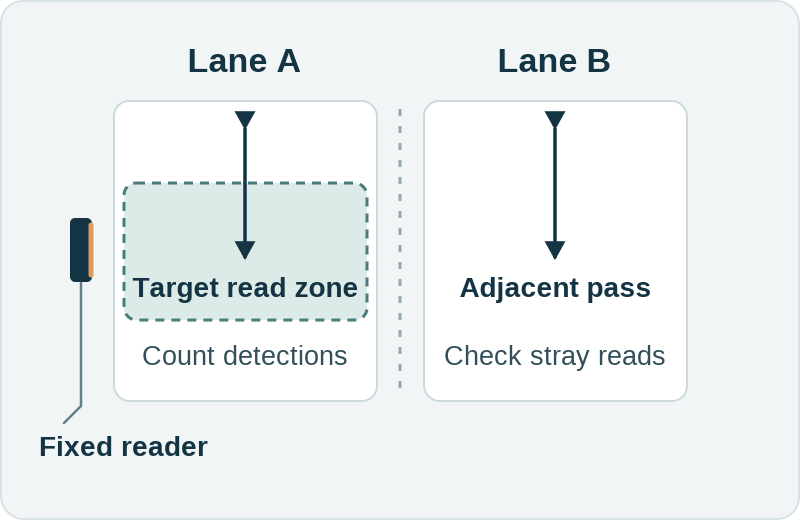
At a UHF gate I’d have the installer check how the antenna faces the walking path. GS1’s guidance on the read zone explains why reader direction and tag angle matter. Adjust one setting at a time and repeat the outside-lane checks after each change. A power increase that catches a missed wrist may also pick up somebody waiting next to the lane.
Test the wristband before the bulk order
- Agree what counts as a pass with the person running the system. For a locker it might be one presentation that opens the assigned door. For a UHF gate it might be one recorded passage for a wearer in lane A, with nobody picked up in lane B.
- Mark the starting position and write down the reader model and the settings the installer used. At a tap reader measure between the reader face and the tag. For a gate, record the antenna position and walking path. Take a quick photo of the setup so it can be repeated.
- Run a set of attempts at the expected distance and pace. Log detection and completed task separately. Use a separate line in the sheet for changes in wearer, orientation or fit. At a two-lane gate, try lane B alone and again while someone walks through lane A. A reader can report the same tag several times as a person walks past. Count passages in the entry system and use the raw reader log to trace a miss or an extra entry. Keep the settings fixed while you compare samples.
Suppose you get 19 detections in 20 locker taps and 18 successful unlocks. In this example there is one presentation where the reader sees nothing and another where the system detects the credential without opening the door. Check the position of the tag for the first result. Check the assigned credential and the lock’s event log for the second. Keep both counts when deciding whether the sample meets your agreed target.
Download the wristband read-range test sheet (CSV).
If you’re sending us a sample request, include the reader model and where the person needs to be when the band is read. For a fixed gate, a photo or sketch showing the walking path and the next lane can save a round of questions. For a tap reader, include a photo of the face if it’s built into a locker or column. That tells us how much room the wearer has to present the band.