

Can a dead MagicBand+ still open your Disney hotel room?
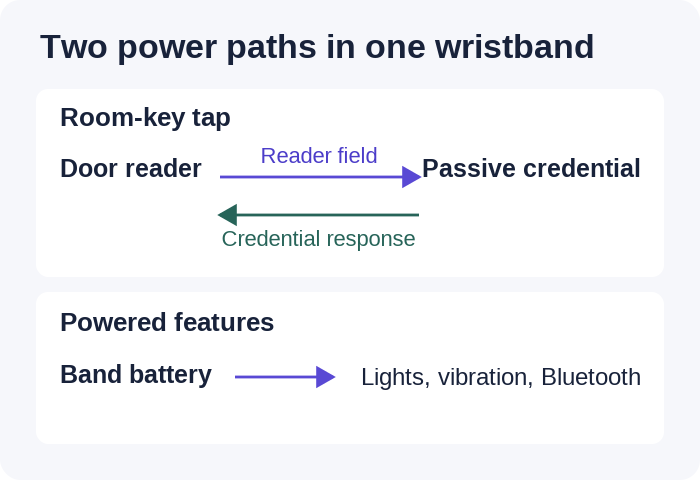
Yes. An active MagicBand+ linked to a guest with access to a Walt Disney World Resort room can still unlock that room with a depleted battery. The tap uses a short-range credential that can respond using energy from the door reader. The band uses its rechargeable battery for features such as lights, vibration and Bluetooth. Those features can go quiet while the room key still works. The planDisney guest guide on depleted batteries also covers what happens at park entry and when charging purchases to a room.
If you only need to get into your room, try the tap before looking for your charger. An already linked band and a brand-new one are different situations. If you haven’t set it up yet, follow Disney’s setup steps or ask the front desk to help with room access.
What happens in the second you hold the band up to the lock?
Inside a passive RFID credential, a small antenna connects to a chip. Bring it near a compatible reader and the antenna picks up enough energy from the reader’s field for the chip to respond. That brief exchange is what we mean by a passive tap. The door hardware supplies its own power for reading the credential and releasing the latch.
A useful way to picture it is a hotel key card. You never plug the card in, yet it responds when it reaches the reader. A rechargeable wearable can add lights or other electronics around a credential that works on the same passive principle. Disney’s guide to its radio-enabled devices describes short-range RF and Bluetooth in MagicBand+. The diagram shows how these jobs can be powered separately. For the RFID part, we’re illustrating the passive principle rather than identifying the chip inside Disney’s band.
A readable credential also needs the right permission. Picture a room change halfway through your stay. Your wristband can stay on your wrist, but access has to follow the new room assignment. Disney describes an assigned code that its system associates with the guest’s benefits. For a hotel team, that separates two questions worth asking at the desk. Can the reader pick up this credential? And can this guest use it at this door, at this point in the stay?
You can see the difference when you try a tap with the band turned away from the reader. The small antenna has to couple with the reader’s field, and the way you hold it can affect that. Moving the band closer or turning its face toward the reader may fix a missed read. If the reader has already picked up the credential and the room assignment is wrong, moving your wrist won’t change the permission. A clearer tap point helps with the first problem. The front desk can help with the second.
When a tap fails, try a second key before blaming the battery
Start with the door itself. Check the room number, then hold the face of the band close to the marked touch point. If you’re holding a contactless card in the same hand, move it away for the retry so you can isolate the band. If the door stays locked, use another key issued for that room, such as an available digital key, or ask the front desk to help. Tell them what happened with each attempt. The pattern is more informative than “my band is dead.”
| What you see | What that tells you | What to try next |
|---|---|---|
| The band is dark and the door opens. | Room access works. The powered features are a separate check. | Use the room key as usual. Charge the band if you want the powered effects. |
| Your band fails and a second key opens the same door. | The door worked with another credential. Your band or its room assignment deserves a closer look. | Ask the front desk to verify the band’s link to the guest and current room. |
| Neither of two keys issued for that room opens it. | There may be a room assignment or lock problem. The wristband alone can’t explain both failures. | Tell the front desk both keys failed and let them check the room and lock. |
A tap that worked at the park earlier is another clue. It tells staff the band worked at that touch point. They still need to check the room assignment, especially after a move, extension or new check-in. If you’re locked out, use a supported alternative key or get help at the desk. You can sort out charging once you’re inside.
How we’d test a wearable room key at a hotel
Disney’s example raises a question we’d put to any resort planning a wearable key. Which jobs must the wristband still do when the guest’s phone is in the room or the wearable hasn’t been charged? At a property that issues room credentials, that usually starts with the room door. The gym, pool entrance or a paid activity can each have different access rules. Put them on the same test sheet so you know what the wristband needs to do at each reader.
We’d begin by asking the lock provider which credential and setup it supports. “RFID” tells you the band uses radio. “NFC” can describe a tap with a phone. Neither tells you that your property can issue the band as a room key. Bring the installed lock model and the provider’s supported chip or credential format into the conversation before settling on a sample. If a guest is also supposed to tap the band with a phone to open a resort map, test that as its own interaction. A phone opening a web page gives you no evidence about room access.
Then run the sample through a short stay with a front desk colleague and the actual doors. On day one, issue a test band and use it on the assigned room, an authorized common area and a door it should refuse. Move the guest to a new room and check both doors after the change. Replace the band as if it were lost, then try both the original and the replacement. Ask the lock provider when the original should stop opening each door and how staff can verify that. Finish by checking what happens after checkout and making sure the front desk has a fallback key it can issue.
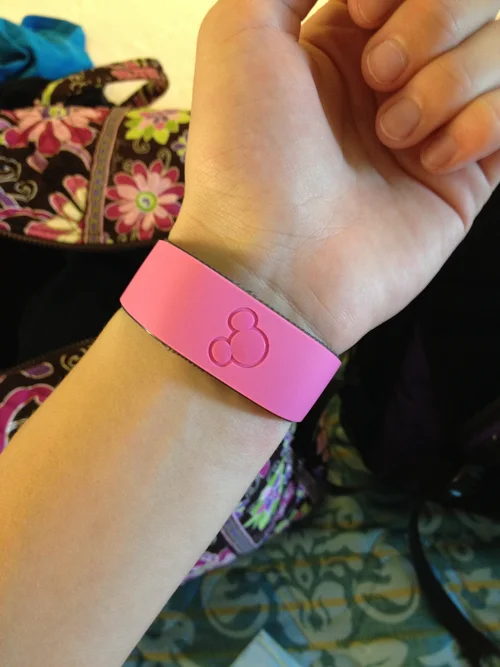
Include the physical wristband in that test. If you’re considering a reusable silicone loop, try the intended sizes and the actual reader location with the band worn. A wristband resting on a desk can be easy to tap. The same design may be awkward to present when the reader is recessed or the tag rotates to the inside of the wrist. Ask a few people to try the door before showing them how you expect them to hold their arm. You’ll learn where the tap marker should go and whether the shape lets guests find it on their own. If the bands will be returned and reissued, put inspection and cleaning of the finished band into the same plan.
Two taps you can put on a test sheet
Say you’re running a conference at a resort. The organizer wants attendees to tap a wristband for the agenda and some guests to use it for their rooms. For the agenda, write down the expected result in plain language. A compatible phone should open the public schedule, and the link should still make sense after a session moves. The schedule can live on a page you can update, so you can change the room name without rewriting a tag for every attendee.
For the room, the test belongs with the property. The door should open only with a credential the property has issued for that guest and stay. Ask whether both jobs can be supported by the same wearable and what the lock provider allows you to configure. If the property already issues room keys through a separate process, keep that workflow clear in the guest instructions. A nice handout at check-in is only helpful if guests can tell which tap opens the schedule and which credential opens the door.
For a conference or resort program that combines guest access with branded interactions, we’d write the room-key and phone tasks as separate acceptance checks. Give the front desk a short script for a guest with a dead wearable, a lost band or a room move. At that point you can see whether the wristband fits the stay you’re designing, including the moments when a guest needs help.
How RFID wristbands work explains what passes between the tag and the reader. Our hotel and resort wristband guide covers how different formats fit the way guests use and return them.
Photo credits
Contemporary Resort · Benjamin D. Esham · CC BY-SA 4.0 (cropped and resized). https://commons.wikimedia.org/wiki/File:Disney%27s_Contemporary_Resort.jpg · https://creativecommons.org/licenses/by-sa/4.0/
Original MagicBand · Julie Friend · CC BY-SA 3.0 (resized). https://commons.wikimedia.org/wiki/File:Disney%27s_MagicBand.jpg · https://creativecommons.org/licenses/by-sa/3.0/