

This guide is about public web links on NFC wristbands. A wristband issued for managed access or cashless payment follows the operator’s own support process.
Read the stored address first
Take a wristband from the issued batch that you own or have permission to inspect. Use the Read view in NFC Tools or another compatible reader to look for a URI record, which is the entry that stores a web address. Copy the complete address, including its path and any query parameters. Then open that address and note where the browser ends up. The two addresses may differ if a server redirects the request.
For example, a tag could store https://example.com/tap/spring, while the phone ends up on a registration page with a different address. Record the first address when investigating the wristband. It is the one that needs to stay reachable after the registration page moves. For an issued batch, read samples from each encoding run you can identify. Similar-looking wristbands may have been programmed with different paths.
If the app does not display a URL, check what it did read before deciding what to change. A compatible phone may detect a tag without being able to read the expected record. A record can also hold a different type of data. The phone reading guide explains the difference. Avoid writing, formatting or locking a tag while diagnosing an issued batch.
What “read-only” in NFC Tools means for the decision
NFC Tools developer Wakdev distinguishes permanently locking a tag from configuring password protection on supported chips. For example, the NXP NTAG213, NTAG215 and NTAG216 data sheet lists both read-only locking and password protection. Confirm the exact chip and its configuration with the person who encoded the batch before deciding which case applies. A failed write attempt by itself is insufficient to identify the cause.
When the pages containing the URL have been permanently locked, treat the stored address as fixed. Changing a password cannot undo that lock. A tag protected only by a password may still be writable by its authorized operator, depending on the chip and settings. Even then, editing the tag requires physical access to each wristband. For a batch people are already wearing, checking control of the original address is usually the better first step.
Choose a route based on who controls the original address
| What the tag points to | Who can act | What to do |
|---|---|---|
| An address on a site your team can edit | The site owner or web team | Update the page at that address or set it to redirect |
| A short link or hosted redirect your organization manages | The account owner for that service | Update the destination of the existing short link |
| A page or short link a third party still controls | The provider or site owner | Ask whether the exact address can be restored or redirected |
| An address nobody can restore or redirect | The team handling distribution | Share a fallback link and assess whether tags must be replaced |
If your site is moving to a new domain, keep the domain and the exact path already stored on the wristbands working. Visitors who tap will ask for that address. Owning a similar domain, updating a QR code on a poster or changing a link in a campaign dashboard cannot repair a request that goes somewhere else. For an HTTPS address, the old host must also be able to serve the request without a certificate error before its server can send a redirect. HTTP Semantics describes how a server indicates a new destination.
When the URL uses a provider’s domain, check which account owns that exact short link and what happens if the account or subscription closes. A new account at the same provider may not control the old link. If an external provider can recover it, ask them to check the original address and confirm the destination before you tell people to try again.
A worked example for an issued batch
An event team handed out two wristband batches before registration opened. Both linked to the old registration provider, but they were encoded on different days. The first batch stores a path on the event team’s own site, which currently forwards visitors to the provider. The second batch stores the provider’s address directly. The team discovers this by reading a representative wristband from each batch.
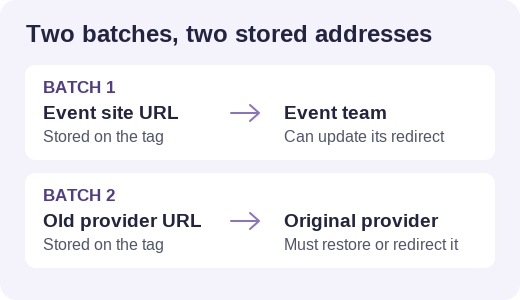
For the first batch, the web team changes the destination on the event site. The wristbands still open the same stored address. When it receives the request, the event site sends visitors to the new registration page. For the second batch, the team asks the old provider to preserve the exact address and route it to the new page. If the provider cannot do that, changing the first batch’s redirect will have no effect on the second. The event can share a separate fallback link and decide whether replacing that batch is practical.
If the next page asks for a login or opens a mobile app, test that handoff too. Seeing the right URL in a browser address bar tells you where the visitor arrived. Ask a colleague without the administrator’s session to try the actual action. A sign-in requirement or access error can look like a bad tap to the wearer even when the NFC tag and redirect both work.
How to verify a change
Write down the sample or batch ID, the URL read from the chip, the owner of that address, the approved target and who can restore the previous destination. Keep these details together so the next person can trace a problem back to the correct batch.
| Check | Pass condition |
|---|---|
| Read a representative band from each encoding run | The stored URL matches the expected address for that run |
| Open the stored URL directly | It reaches the intended page without a warning, loop or dead end |
| Tap on a compatible iPhone and Android phone | The phone's ordinary tap flow reaches the intended page |
| Try the task as a visitor | The required action works without the team's administrative session |
| Record the rollback | The web or provider owner can restore the previous working route or switch to an approved fallback |
Repeat the browser check with a fresh session if a phone still opens the old page. A previously cached redirect can make two phones behave differently. If the tap keeps failing but opening the stored URL directly works, check the device and what the tag actually contains before changing the web route again.
Set up the next batch with a stable address
Use an address your organization can keep through a change of website or campaign platform. Assign a separate path to each batch or campaign when their destinations need to change independently. Keep the domain renewal, DNS and HTTPS responsibilities with the same handover record as the person authorized to edit the redirect. Before encoding the full run, check the path on representative devices and agree who will maintain it after the event ends.
A public link on an NFC wristband can be opened by anyone who obtains the address. If the page serves private information or a restricted task, put access controls on the website. For a new batch, use the RFID and NFC chip selection guide to separate a simple phone link from other credential requirements.